
A Brief Discussion on the Differences Between Git Merge and Rebase
TLDR
git mergepreserves the complete branch history and merge nodes, making it suitable for merging heterogeneous branches (e.g.,mainanddevelop).git rebaserewrites history to maintain a linear structure, making it suitable for cleaning up local branches before pushing to a remote.git mergerequires resolving conflicts at most once;git rebasemay trigger conflicts while moving each commit, requiring multiple resolutions.- Never perform
git rebaseon shared branches to avoid rewriting history and causing collaboration conflicts. git pull --rebasecan prevent unnecessary merge commits when synchronizing with remote changes.
Two Ways to Merge Branches
In Git, there are two main strategies for merging branches: git merge and git rebase. Both have significantly different impacts on the Commit History.
git merge
When to use: When you need to integrate two branches with different objectives (e.g., main and develop).
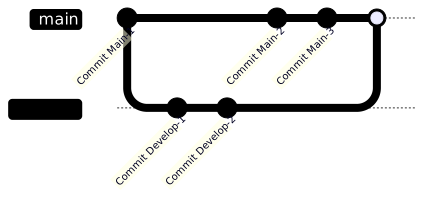
- Working Principle: Merges the changes from one branch into the target branch and creates a new merge commit.
- Pros: Preserves the complete history and the exact time of the merge; provides a clear structure when merging heterogeneous branches.
- Cons: Frequent merging leads to a complex history; generates too many unnecessary merge commits.
- Conflict Handling: Only requires checking the differences with the latest commit of the target branch; at most, you only need to resolve conflicts once.
git rebase
When to use: When you need to organize the commit history of a local branch so that it appears as if it branched directly from the target branch.
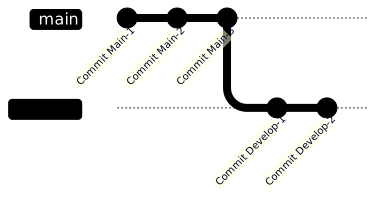
- Working Principle: Moves the commits of the current branch to the tip of the target branch, thereby rewriting history.
- Pros: Keeps the commit history clean and linear.
- Cons: Rewriting history causes the loss of the original merge points; using it on shared branches will cause chaos in team collaboration.
- Conflict Handling: During the process of moving each commit, if that commit conflicts with the base branch, you must resolve them one by one, which may lead to multiple conflict resolutions.
Branch Diagram Example
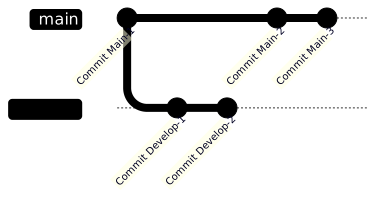
The following uses Mermaid to visualize the differences in operations:
Original Branch History:
Result of Merge:
Result of Rebase:
Usage Timing and Recommendations
Branch Homogeneity Judgment
- Homogeneous Branches: Refers to the remote and local versions of the same branch (e.g.,
origin/mainandmain). It is recommended to usegit rebase. - Heterogeneous Branches: Refers to branches with different objectives (e.g.,
mainanddevelop). It is recommended to usegit merge.
Practical Recommendations
- Synchronizing Remote Changes:
git pullis essentiallyfetchplusmerge. It is recommended to usegit pull --rebaseto integrate local changes on top of remote changes, avoiding unnecessary merge commits. - Before Sending MR/PR: It is recommended to use
git rebaseto move the branch to the latest state of the target branch to ensure there are no conflicts before submitting. - Advanced Operations: You can use
git rebase -interactive {starting Commit}to perform commit squashing, reordering, or message modification.
TIP
The responsibility for resolving conflicts—whether it lies with the reviewer or the MR submitter—varies by team. Please follow your team's specific guidelines.
WARNING
Except for git pull --rebase, Rebase-related operations should only be performed on branches you are developing yourself; do not perform them on shared branches.
Rebase operations on shared branches should only be performed before a git push has occurred. Once git push has been executed, changing the local repository's commit history will cause the local and remote histories to diverge. If you use git push --force to forcibly update the remote repository, it will cause the local repository histories of other team members to become inconsistent. Such operations not only affect team collaboration but may also trigger disputes.
Change Log
- 2024-08-23 Initial document creation.